SAP Cloud ERP
Take the standard as your baseline, and solve extensions outside the core.SAP Cloud ERP is a SaaS ERP built on processes SAP has configured in advance, with two major upgrades a year. The decision does not turn on whether the functionality is sufficient; it turns on whether your organisation is ready to treat the standard as its baseline. ECHOIT is an SAP Silver Partner that has implemented and run SAP ERP since 2008, with more than 1,000 implementation and operations references.
Accept the standard and both upgrade effort and running costs fall structurally. In return, the exceptions your systems have absorbed until now have to be settled as business rules. What follows is the criteria for that judgement and how it works in practice.
Three conditions that decide whether SAP Cloud ERP fits
Condition 1. Adopting the standard
Authority to align processes with the standardDoes the project organisation have the authority to settle business exceptions and adopt the standard processes?
- Exception list
- approval authority
- change management plan
Condition 2. Absorbing updates
Half-yearly releases as routine operationsCan the two updates a year be planned as routine operations, with the regression testing they require?
- Release calendar
- level of test automation
- operations staffing
Condition 3. Extension strategy
Distinctive requirements outside the coreIs the design and development capability in place to build genuinely distinctive functionality as BTP-based extensions?
- Extension requirements sorted
- public APIs available
- development practice
How the SAP standard core connects to Korean business practice
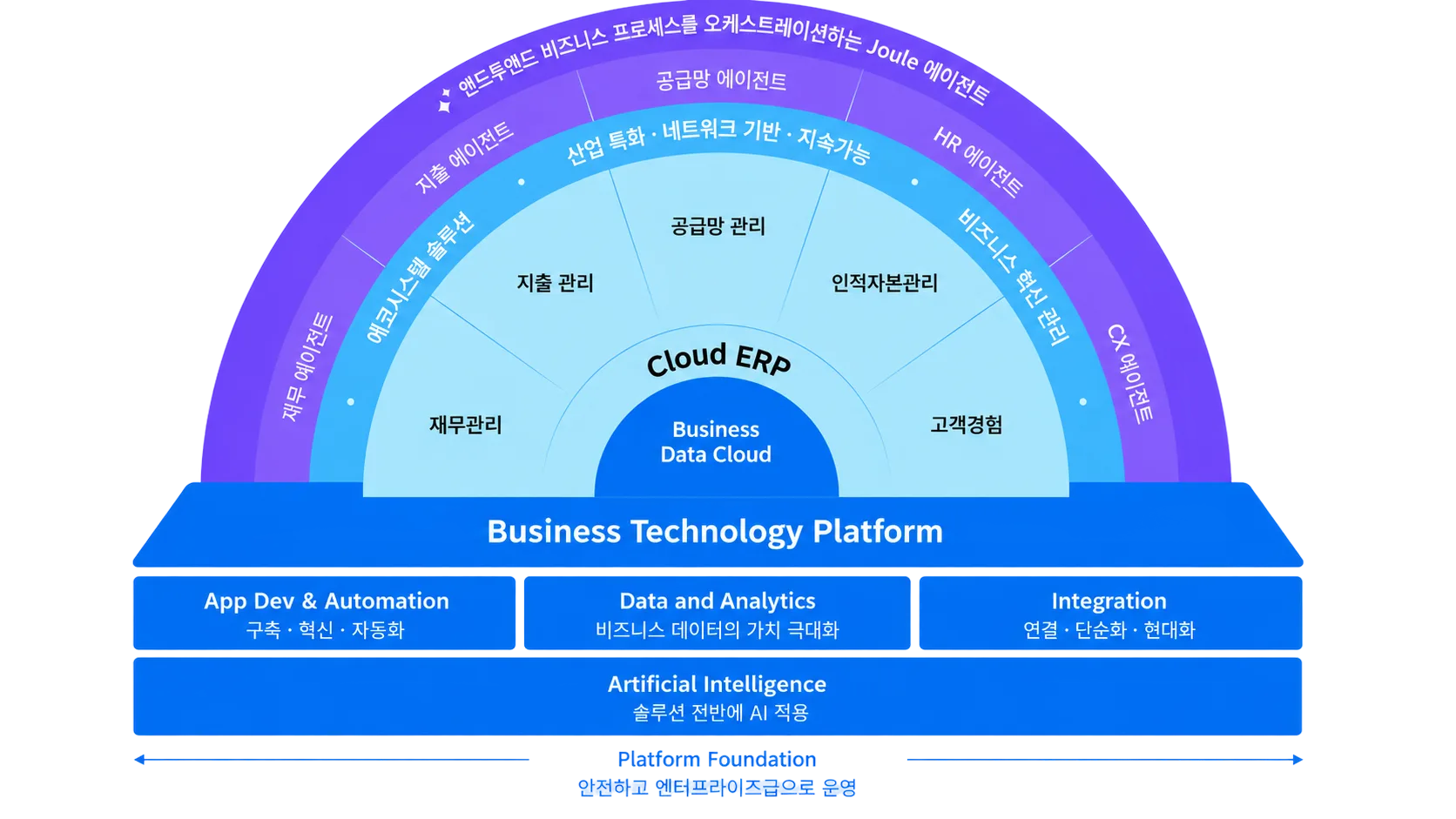
A module here means a business area. The Korea-specific items are under review, and the scope ECHOIT holds and delivers is [to be confirmed].
Pre-configured processes are where design starts
SAP Cloud ERP already carries processes proven by industry and business area. Rather than designing from a blank page, a project works by comparing those configured processes against how you work today. Design gets shorter not because more people are added, but because fewer decisions are left to make.
Fit-to-Standard is not requirements gathering
Ordinary requirements definition collects what the business wants and turns it into a list. Fit-to-Standard runs the other way. The standard process is demonstrated first, and only the points that flow cannot handle are recorded as gaps. Those gaps are then sorted into three kinds: settled by adjusting a business rule, solved by configuration, or needing an extension.
ECHOIT keeps that result in two separate documents, a gap list and an extension requirements sheet. They are separate because a good share of gaps close through a business agreement rather than development. Without the split, the initial gap count gets mistaken for the development volume.
Scope is fixed in units of Scope Items
Scope in SAP Cloud ERP is managed not as a feature list but in the Scope Items SAP defines. Once you know which Scope Items to activate, and what organisational structure and master data each one assumes, the build scope and the data preparation scope are settled at the same time. Change requests are recorded in the same units, so their effect on schedule and cost is visible immediately.
Record-to-Report
Source-to-Pay
Order-to-Cash
Plan-to-Produce
Conditions for fixing scope — Entity · accounting standard · localisation confirmed
Which scope applies, and the Scope Item IDs, are confirmed against the release, country, and contract scope you choose.
Start on the standard, and keep a clean core through the updates
SAP Cloud ERP (Public) is about adopting SAP standard processes in a new build and holding that structure while you run. Because the ERP core is never modified directly and only supported extension points and public APIs are used, business processes and extensions can be verified more reliably against SAP's regular updates.
The three extension layers of SAP Cloud ERP
First, key user extensibility covers what a business user can do inside the tools: extra screen fields, user-defined items, simple logic. Second, developer extensibility builds upgrade-safe ABAP extensions inside the ERP using only objects SAP has released, and it exists only in SAP Cloud ERP with its three-system landscape. SAP Cloud ERP Private falls back on the legacy approach of modifying the core directly, which SAP does not recommend. Third, side-by-side extensibility puts a separate application on SAP BTP and talks to the ERP through public APIs, which suits complex, distinctive work.
The order of resort is key user, then side-by-side, then developer, with direct changes to the core left until last. Contact with the core stays on public APIs, so updates affect less.
Key user extensibility
Developer extensibility · Public only
Side-by-side / SAP BTP
APIs and extensions are verified together, update by update
In Public, extension compatibility has to be checked against the regular updates SAP manages. When a requirement arrives, ECHOIT first confirms and records the target API, its supported scope, call constraints, and release impact. If the API you need does not exist, standard functionality, a process change, and SAP BTP alternatives are all considered before any development starts.
What Public covers, and which APIs apply, are confirmed against the release, country, and Scope Items you choose.
Frequently asked questions
Start with the criteria for product, adoption, and operations.
Fit-to-Standard separates a business change, a standard configuration, and an extension. If the gaps in core processes are large, we go back and reconsider which edition fits.
See how Fit-to-Standard runsA greenfield build on standard processes points to Public; continuity with existing ECC assets points to Private. The edition follows from the assessment of your current system and how far your organisation can adopt the standard.
See how to choose an editionBegin by setting out your current system, process scope, target timeline, and organisational constraints. Work through the checklist in the decision guide, and anything still open can be worked out together in conversation.
Request a consultationBegin by setting out your current system, process scope, target timeline, and organisational constraints. Work through the checklist in the decision guide, and anything still open can be worked out together in conversation.
Request a consultationWe analyse how custom code is actually used and what it affects, then sort it into keep, replace, or retire. The standard core stays protected, and the extensions you still need are reviewed as side-by-side options such as BTP.
See the clean core approachThe end-of-support date depends on the product you run today and on your contract terms. Pin down your system version and migration constraints first, then check the timeline in the SAP Cloud ERP Private review.
Request a consultationStart with user roles, process scope, interfaces, data migration scope, and operating conditions. Compare not just licences but build, migration, and run costs over the same scope and the same period.
Request a consultationBegin by setting out your current system, process scope, target timeline, and organisational constraints. Work through the checklist in the decision guide, and anything still open can be worked out together in conversation.
Request a consultationCarry the review forward on how far you can adopt the standard
Assess whether SAP Cloud ERP fits, or compare it against an asset-led SAP Cloud ERP Private.